Your CRM Can Track a Job. It Can't Make the Phone Ring.
A clean job board with no new jobs on it is just a nice-looking empty board. Software runs the work. Something else has to bring the work in.
Roofing software like Roofr and AccuLynx helps you run jobs from measurement to payment. Rent Roofing Sites starts earlier: the territory, the site, the call, and the lead, then carries it into a job file. You can use our hub alone, or bring leads in and keep your current software.
Reviewed September 24, 2026. Check each provider's current official terms before purchase.
Roofing demand still has to fit the property, crew, and service area.
SOURCED COMPARISON
Capability map
Native = built in. Manual = you can do it by hand. Not available = not in the product today. Competitor features come from their own sites on the checked date. We sell Rent Roofing Sites, so this is a vendor-written comparison.
Question
Roofr
AccuLynx
Rent Roofing Sites hub
Bringing in new demand
Add-ons: Instant Estimator, Roofr Sites (beta), AI Receptionist
Not a lead source on its plan page; verify
Native: territory sites and tracking numbers
Call tracking
AI Receptionist add-on answers calls
Verify with sales
Native: calls logged per territory
CRM / pipeline
Native job boards
Native Sales/CRM and production
Native job board and lead pages
Measurements
Native paid reports ($13–$19 each by plan)
Verify with sales
Native estimate from public data; pitch assumed; not survey-grade
Estimates / proposals
Native proposals
Native document tools
Native Good/Better/Best from your pricebook
Crew / production
Crew management on Scale plan
Native production and crew management
Manual: stages and tasks; crew role hides money
Invoices and payments
Native invoices; card and ACH on Essentials and up
Native payments
Native invoices; online card payments not ready yet
$97 per qualified call; $997 per site per month; $497 site setup; $497 new territory. Final terms depend on territory approval and the signed agreement.
Prices and terms change. Check each company's current page and your written agreement before you buy.
01
Demand first, software second
A CRM stores and moves jobs. It does not create homeowner demand in your ZIP codes by itself.
Where does the next lead come from?
Who answers the call?
How does the lead become a job file?
Can you tie revenue back to the source?
02
What our hub does today
These are working in the Roofer Back Office now.
Territories, tracking numbers, calls, and leads
Lead page, appointments, and inbox
Job board with 16 stages and a money trail
Pricebook, Good/Better/Best estimates, homeowner e-sign, invoices, cash/check payment records
03
What it does not do yet
We would rather tell you now than after you sign.
Online homeowner card payments: being set up, not ready
Real texts and emails from the inbox: queued, not sent yet
Roof measurements: an estimate, pitch is assumed — not a survey
No QuickBooks, supplier ordering, or Roofr/AccuLynx integration today
WORKED EXAMPLE
Coexistence workflow: keep your CRM, add a territory
No integration is claimed. A roofer on AccuLynx rents a territory. Leads and calls land in our Back Office. When a lead becomes an inspection, the office copies it into AccuLynx by hand, and marks it Won or Lost in our hub so the territory report stays honest.
REAL PLATFORM VIEW
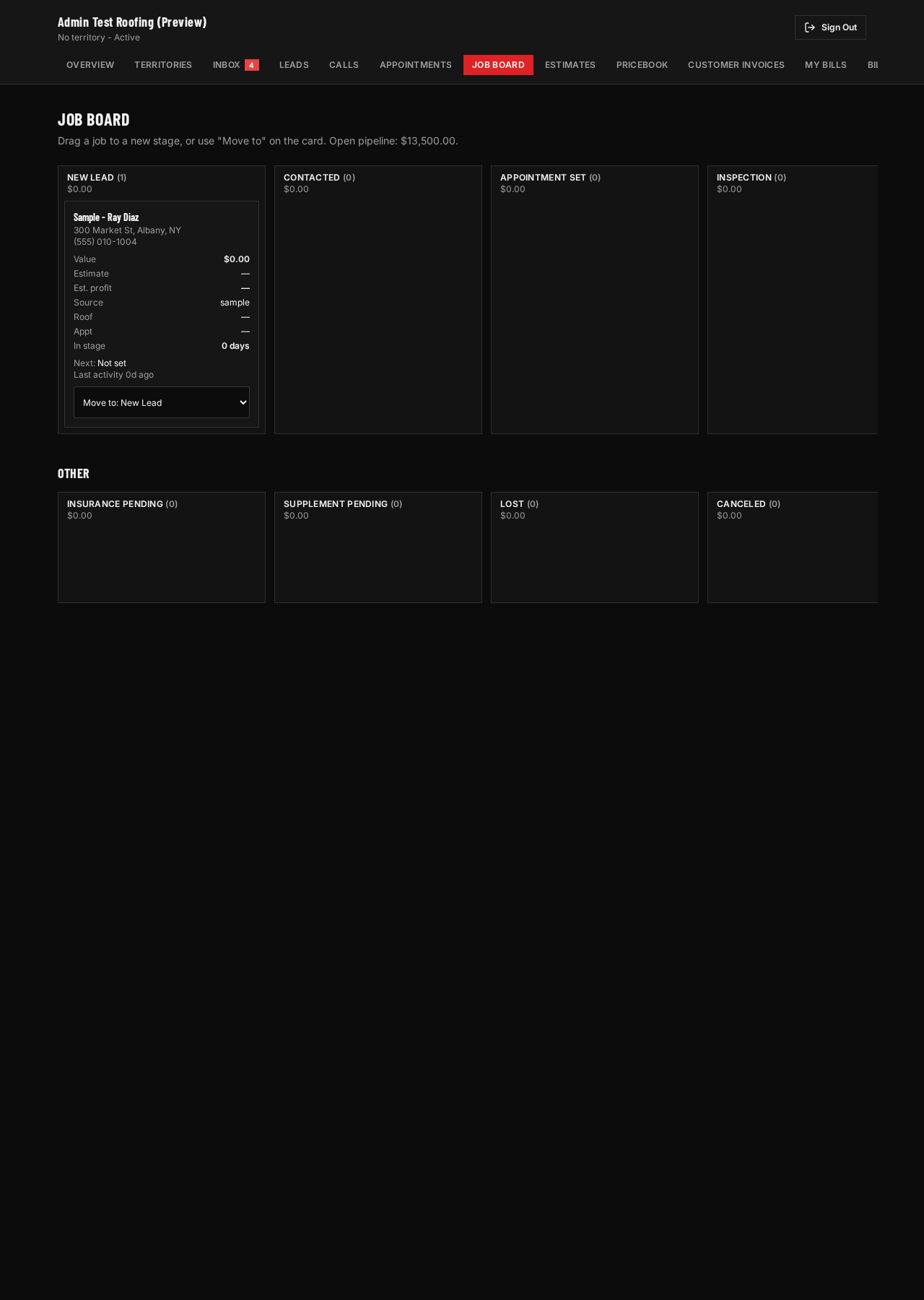
The lead stays connected to the work.
This screenshot comes from the actual Roofer Back Office in a labeled sample account. It is not an AI-made dashboard. Sample names and 555 phone numbers are used; no real homeowner data appears.
Real job board, sample account. Leads become jobs that move through stages.
EXPLAINER VIDEO
Your CRM Can Track a Job. It Can't Make the Phone Ring.
Licensed stock narration. Real roofing context. Real platform screens with labeled sample data.
Read transcript
You set up the software. The job board looks perfect. Stages, colors, tasks. And there is nothing new on it. A roofing CRM runs the work. It does not, by itself, bring the work in. Tools like Roofr and AccuLynx help roofers go from measurement to proposal to payment. Roofr publishes its plans and sells some lead add-ons. AccuLynx asks you to request a price. Both are real tools for running jobs. Rent Roofing Sites starts one step earlier. You rent a territory. Calls and forms land in the Roofer Back Office. From the lead page you book the inspection, create the job, build a Good, Better, Best estimate from your own pricebook, and send the homeowner a link to sign. Here is what we will not pretend. Online card payments are still being set up. Texts and emails are queued, not sent. Roof numbers are estimates, not surveys. And we do not integrate with Roofr or AccuLynx today, so if you keep them, your office moves won jobs over by hand. If your crews have open days, software will not fill them. Demand will. Check My Territory to see if your market is open.
For some small crews, it may cover leads through estimates and invoices. It does not have their full measurement, payments, crew, and accounting depth today. Compare the capability map before switching.
Do you integrate with my CRM?
Not today. We will not claim an integration that does not exist. You can work both systems side by side.
Does a CRM bring me leads?
Not by itself. A CRM organizes work you already have. Some vendors sell lead add-ons; check what each one does.